subjectId: 600419
visibleTabCount: 6
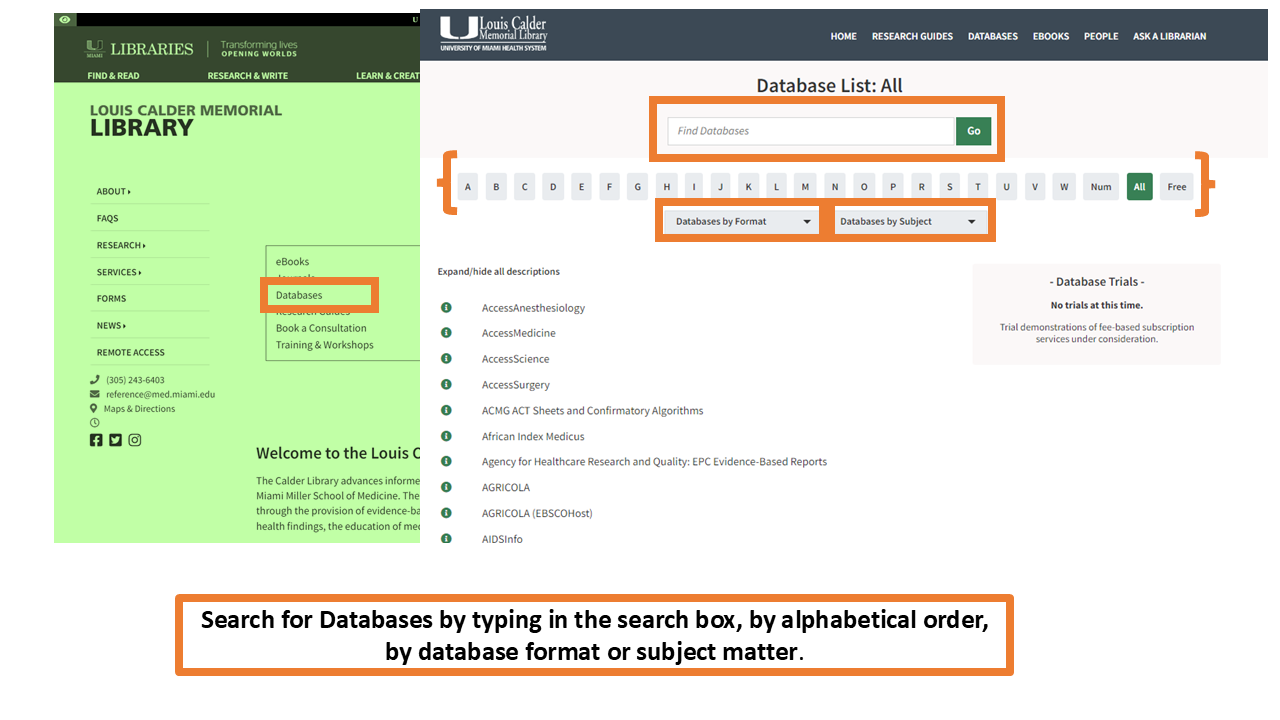
You can find shortcuts to the most commonly used databases in the "Popular Resources" section of the library homepage.

Welcome
The goals of this guide are to:
- Provide essential information for new and current medical students.
- Inform and assist medical students access essential resources through the Calder Library.
This guide is intended for medical students at the University of Miami Miller School of Medicine. It has information about both on-campus and online resources available to medical students.
You may navigate this guide by using the links on the Table of Contents at the left or by using the Tabs on top of each page.
Subject Specialist
-

Barbara M. Sorondo
Head of Learning, Research, and Clinical Information Services
Contact Us

Department of Learning, Research, and Clinical Information Services
- Email: reference@miami.edu
- Phone: 305-243-6648
- Ask a Librarian
Where to Find and Search for eBooks and eJournals
You can browse books, journals and databases from the library homepage by clicking on the tabs in the Start Your Research section of the page. You can also search for library resources using the uSearch box at the top right of the homepage. For more information on how to conduct searches using uSearch look at our online uSearch Guide.
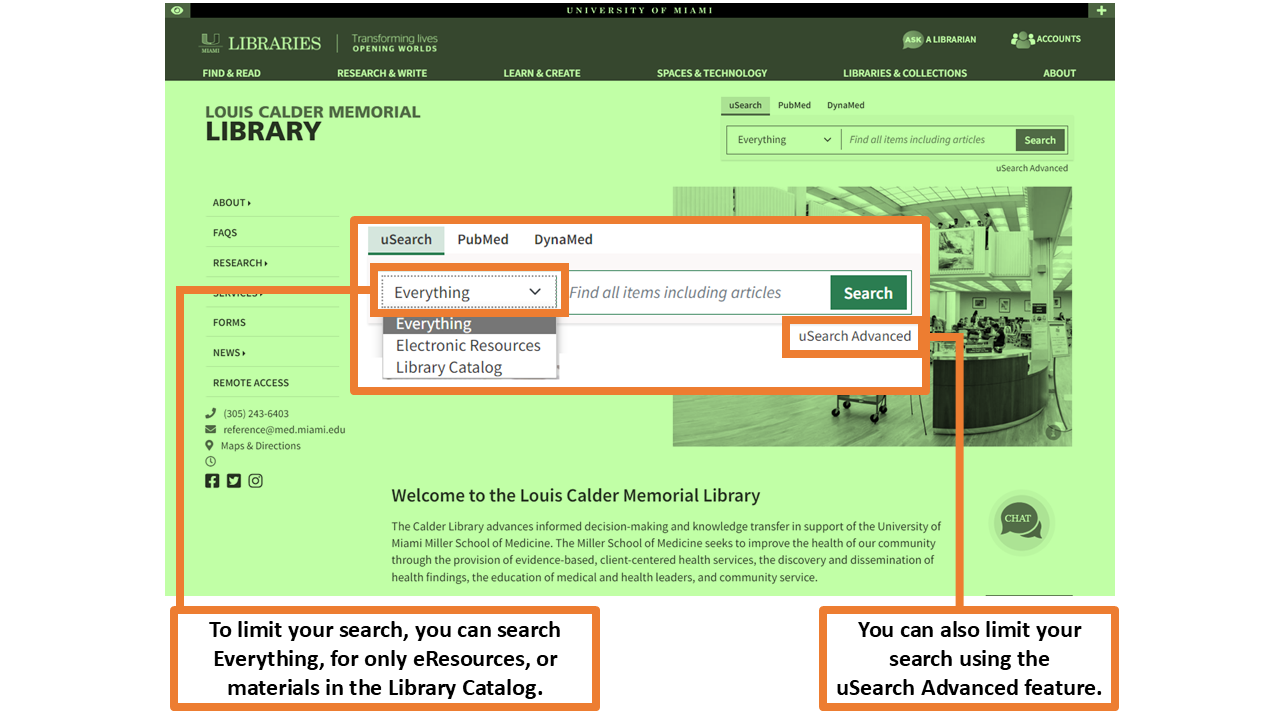
To limit your search results, you can search by Everything, Electronic Resources, or Library Catalog by clicking on the drop-down menu on the uSearch box.
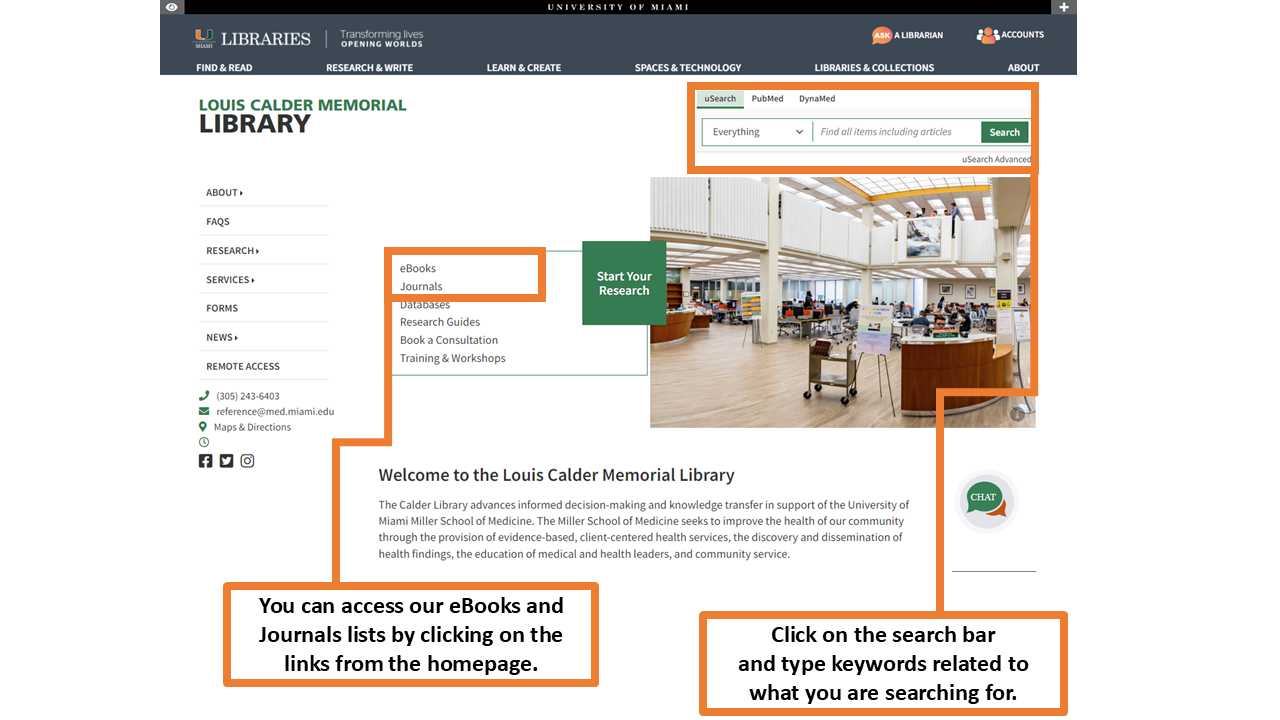
On the results page you will find the list of results matching your search. On the left-hand side, you can further limit your search results by date, language, subject, etc.
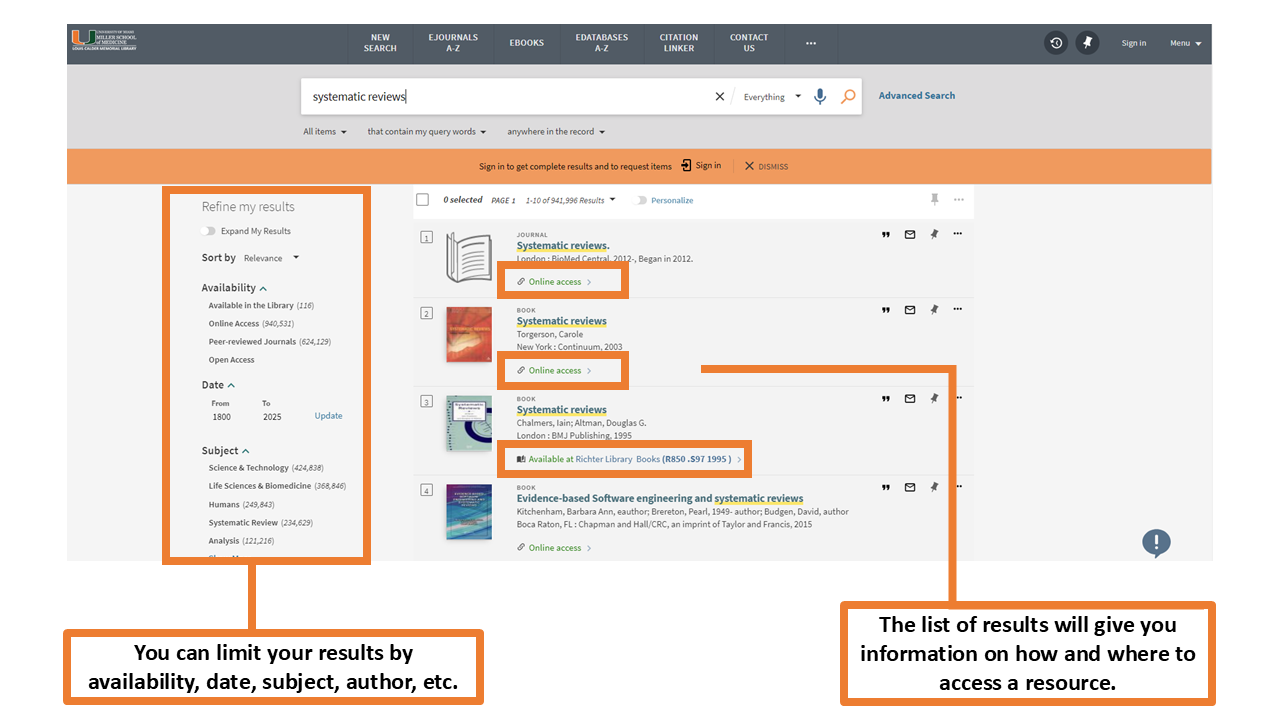
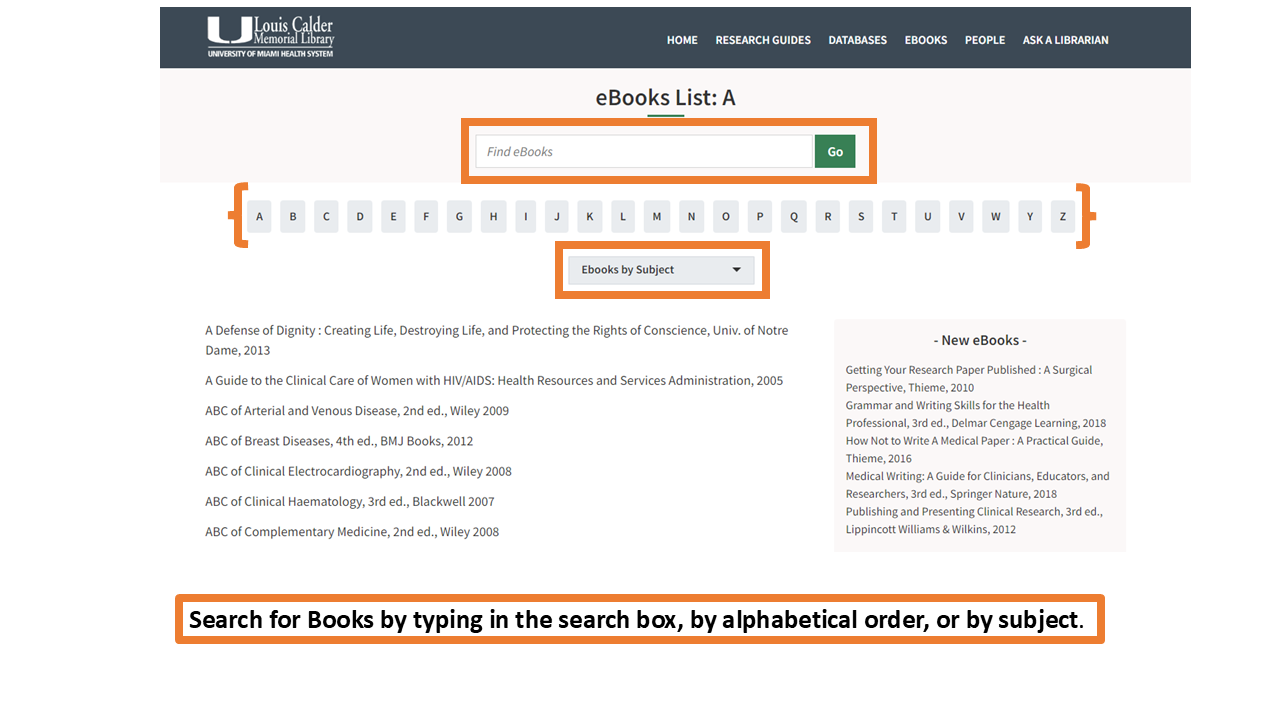
To search for Books, type into the search box, find titles by alphabetic order or my subject matter.
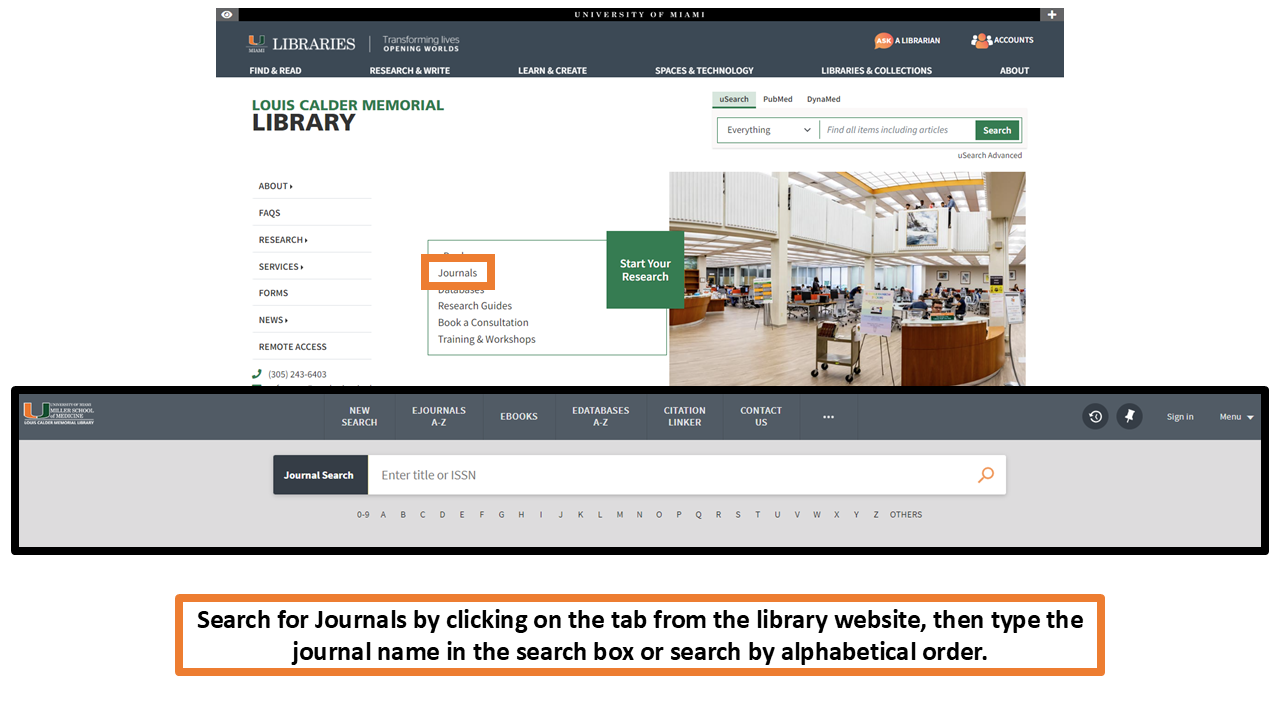
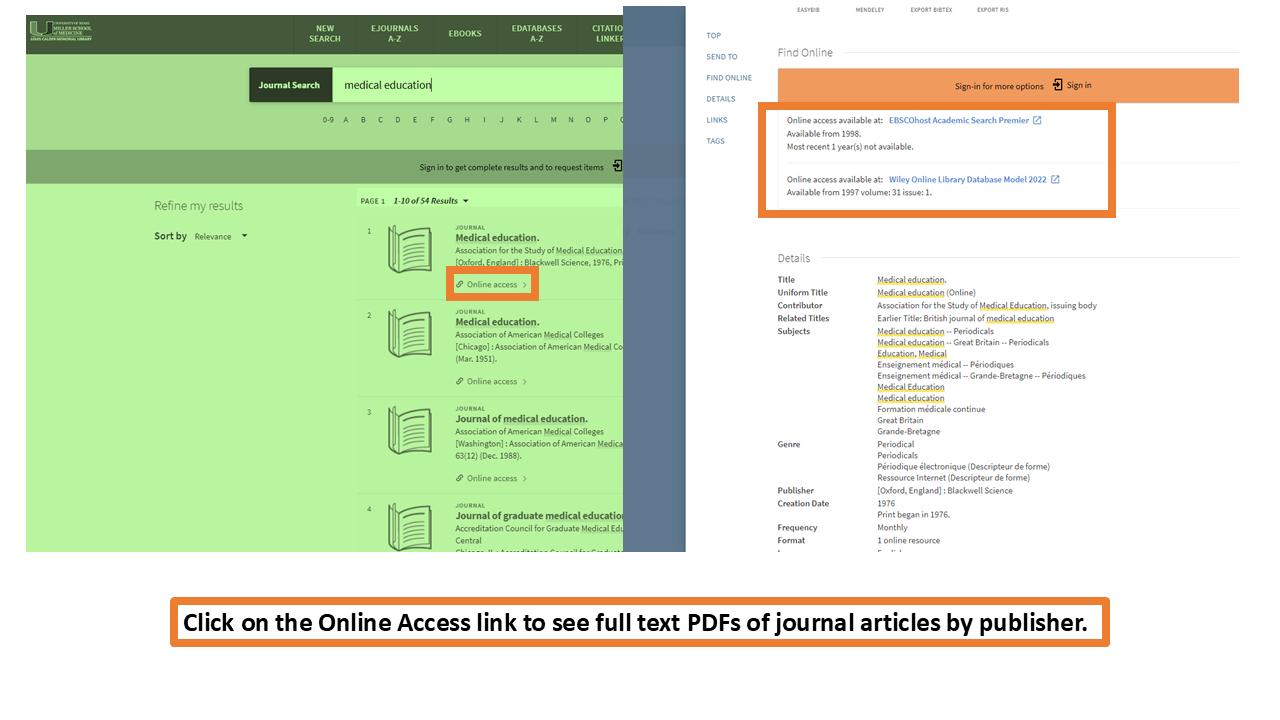
Find journals from the Journals tab on the website. Once on the Journal Search page, you can type the journal title in the search box, or find them by alphabetical order. When you find the journal you need, click on the Online Access link to see full text PDFs of journal articles by publisher.
Searching Databases
To search for Databases, click on 'Databases' under the 'Start Your Research' section of the library homepage. Then, type the database name in the search box. You can also browse by alphabetic order, format, or subject matter.
You can find shortcuts to the most commonly used databases in the "Popular Resources" section of the library homepage.
Helpful Links
Browse Databases A-Z List
Database Guides
Clinical Decision Support Databases
Includes Harrison's Online and Goodman and Gilman's Pharmacology. McGraw-Hill's AccessMedicine.com is an online resource that provides students, residents, clinicians, and researchers with instant answers to clinical questions from the most trusted sources. Updated daily and expanded continuously, AccessMedicine is designed for direct access to the information necessary for completing evaluations, diagnoses, case management decisions, conducting research, medical education, or self-assessment and board review.
Bates' Visual Guide to Physical Examination
Bates Visual Guide delivers clinical skills videos from head-to-toe and systems-based physical examination techniques for the (Advanced) Assessment or Introduction to Clinical Medicine course; including Objective Structured Clinical Examination OSCEs videos. The site features more than 8 hours of video content.
ClinicalKey is a clinical search engine that supports clinical decisions by making it easier to find and apply relevant knowledge.
DynaMed is the next-generation clinical reference tool physicians can rely on for fast, easy access to point-of-care decision
support. Written by a team of specialized physicians and researchers, content is updated several times daily to include information
on the latest evidence-based research, providing practice-changing answers to clinical questions with optimized speed.
American Psychiatric Association Publishing is the world's premier publisher of books, journals, and multimedia on psychiatry, mental health and behavioral science. We offer authoritative, up-to-date and affordable information geared toward psychiatrists, other mental health professionals, psychiatric residents, medical students and the general public. Includes Diagnostic and Statistical Manual of Mental Disorders (DSM-5-TR)
Clinical decision support tool designed to answer clinical questions that arise in daily practice. Subscription database with access for UM/JMH authorized users.
Diagnostic decision support system (CDSS) merges medical images and expert information to help you build a patient-centric differential diagnosis.
Research Databases
EMBASE, from Elsevier Life Sciences Solutions, provides extensive coverage of international biomedical journals and conferences and is a key resource for generating systematic reviews, making informed decisions in evidence-based medicine, and for post-market surveillance of drugs and medical devices.
Cochrane Library
Collection of health databases providing independent evidence to inform clinical treatment decisions and other health related decisions. Includes: Cochrane Database of Systematic Reviews, Cochrane Controlled Trials Register, Database of Abstracts of Reviews of Effects, Cochrane Methodology Register, Health Technology Assessment Database and NHS Economic Evaluation Database.
Abstracts of scholarly journal articles, book chapters, books, and dissertations, in behavioral science and mental health. Citations and summaries date back to early 1800s; journal coverage from 1887 to present. From the American Psychological Association.
Database produced by NLM (National Library of Medicine) containing bibliographic references, including abstracts of articles from thousands of bio medical journals.
The Web of Science is today's premier research platform, helping you quickly find, analyze, and share information in the sciences, social sciences, arts, and humanities. You get integrated access to high quality literature through a unified platform that links a wide variety of content with one seamless search.
The Writing Center
The Writing Center can assist students with various writing projects for more information or to schedule an appointment click on the link below:
Citation Management Guides
For more information on how to use citation management software see the guides below:
Citation Management Tools
A downloadable bibliography and database manager that enables you to collect citation information from databases, websites, and more; organize them; and use them to create bibliographies and in-text citations. The link provided will take you to the University of Miami Information Technology website where you can download EndNote.
Note: To access, users must create/log into an individual account. Refworks is a web based bibliography and database manager that allows users to create their own personal database by importing references from text files or online databases.
Zotero
Zotero is a free, easy-to-use tool to help you collect, organize, cite, and share your research sources.
The Research Guide
The Research Guide's goals is to
- Provide essential information for your research endeavors.
- Help users access essential resources through the Calder Library.
The guide is intended for researchers at the University of Miami Miller School of Medicine and the Jackson Health System. It may also be helpful to researchers at other institutions, though some resources are limited to UM/JMH users per licensing agreements.
For more information see the Research Guide.
Create Your Researcher Profile
ORCID @ UM
Information on creating and using an ORCID iD at the University of Miami. Your ORCID iD is a unique identifier for researchers that provides a persistent digital identifier to distinguish you from all other researchers.
Setting up your free ORCID account takes only minutes. Once you create your account, you can use it to keep track of all your scientific papers.
Information on creating and using an ORCID iD at the University of Miami. Your ORCID iD is a unique identifier for researchers that provides a persistent digital identifier to distinguish you from all other researchers.
Setting up your free ORCID account takes only minutes. Once you create your account, you can use it to keep track of all your scientific papers.
Research Navigator
The Research Navigator is a concierge service that connects researchers to the right resources at UM. It is a one-on-one, centralized support service designed to help researchers focus on research, not roadblocks.
Contact the Research Navigator at Navigator@miami.edu.
Online Library Resources
Remote Access: UM students can access our online materials off campus by using the EZ Proxy link here.
Training & Consultations: Register for statistical programs classes and database training here. To schedule a librarian consultation email reference@miami.edu.
FAQ: Check our Frequently Asked Questions (FAQ) page.
Chat: Talk to our staff live by using the Ask A Librarian feature.
Social Media: Follow us on our Social Media......
Mango Languages: UM Library patrons have access to the Mango language learning app where they can learn several different languages such as Spanish, French, German, and more. To register for an account, click here!
IT: For Information Technology (IT) related questions, students can contact UMIT by calling them at (305) 243-5999 or email them at help@miami.edu.

On Campus Library Resources
Study Rooms: Individual and group study rooms are available for check-out at the Circulation Desk on the first floor.
3D Printer: Students can request 3D prints, free of cost, by contacting staff at the Circulation Desk on the first floor. For more information on how to request a 3D print click here.
Statistical Software: Students can access statistical software such as SPSS, SAS, Prism, and Tableu on library computers. For a consultation contact our Biomedical Data Librarian, Dr. Thilani Samarakoon, at thilani.samarakoon@miami.edu .
Biomedical Services: Students can have pictures and posters made with Biomedical Communications, located in the basement floor of the library. You can call them at (305) 243-6783.
UPrint Services: Students have access to printers on the first and second floor of the library.
Interlibrary Loan (ILL): For books, articles, and other materials that the Calder Library doesn't own or subscribe to, students can request copies from external libraries through ILL.
Other UM Resources
Blackboard
Students use Blackboard, an online course system, during their first two years to access materials and complete required activities pertaining to the Evidence-Based Medicine Theme as part of their Doctoring 1-4 courses. A university assigned login and password is required to access this online information resource.
Miller School of Medicine Department of Medical Education
Access online schedules and calendars.
National Board of Medical Examiners
Provides information on licensing exam services including sample assessments.
Writing Center
The Writing Center can assist students with various writing projects for more information or to schedule an appointment.