subjectId: 683514
visibleTabCount: 9
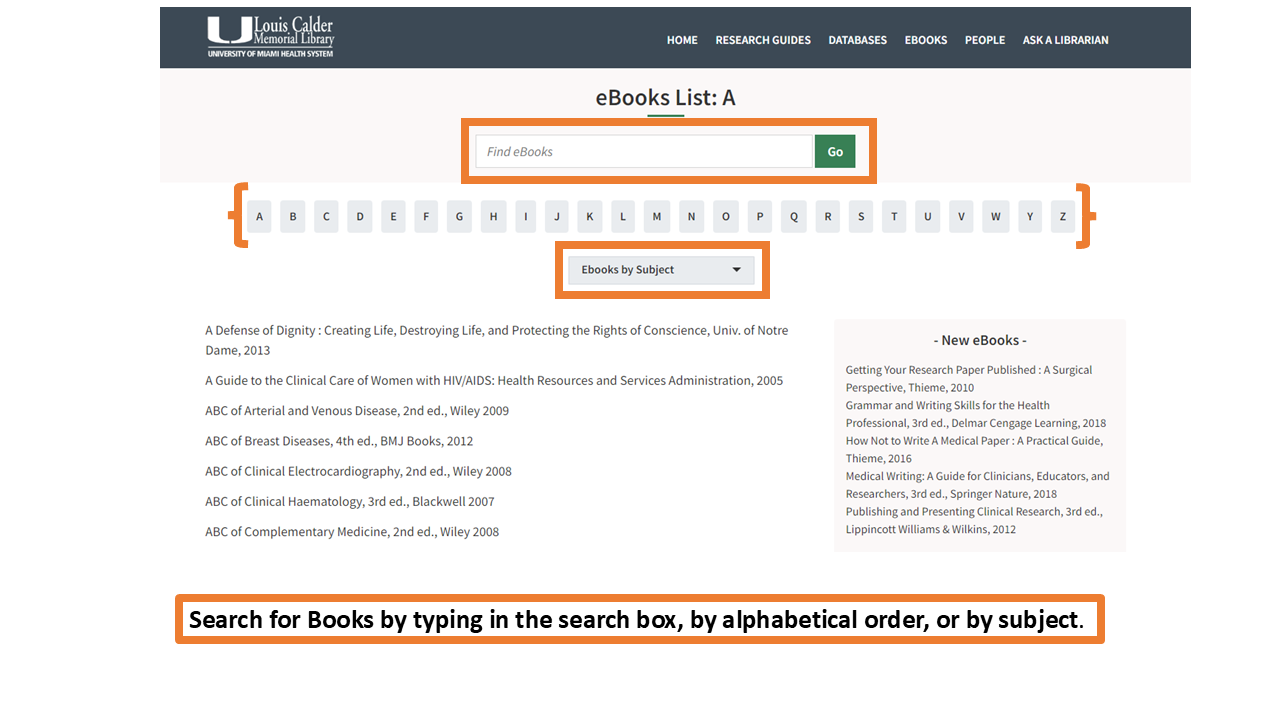
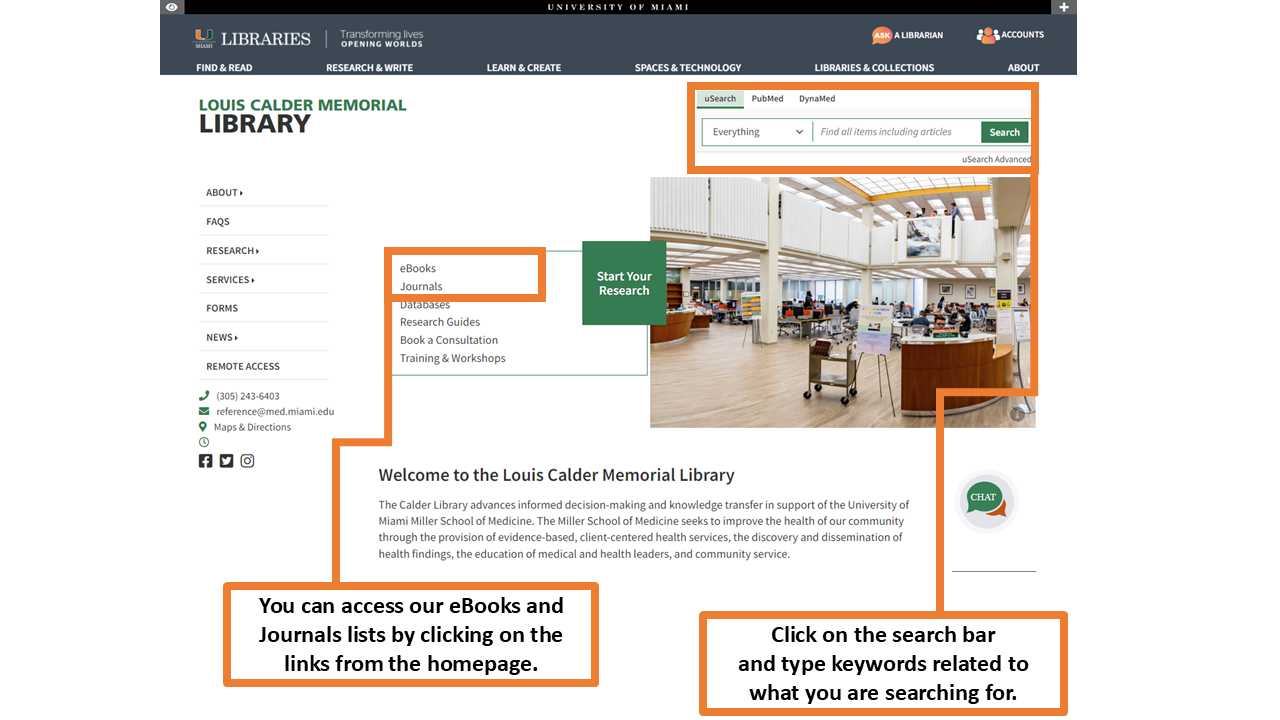
To search for Books, type the title or topic in the search box. You can also browse titles by alphabetical order or subject.
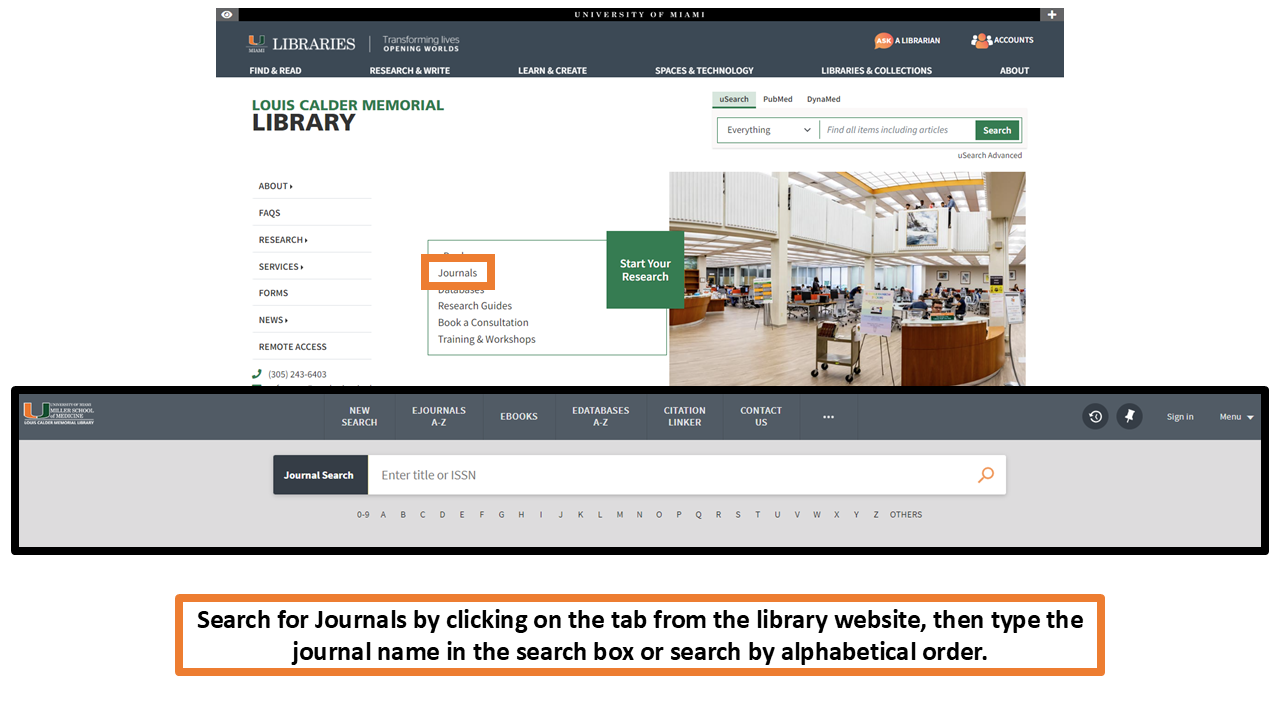
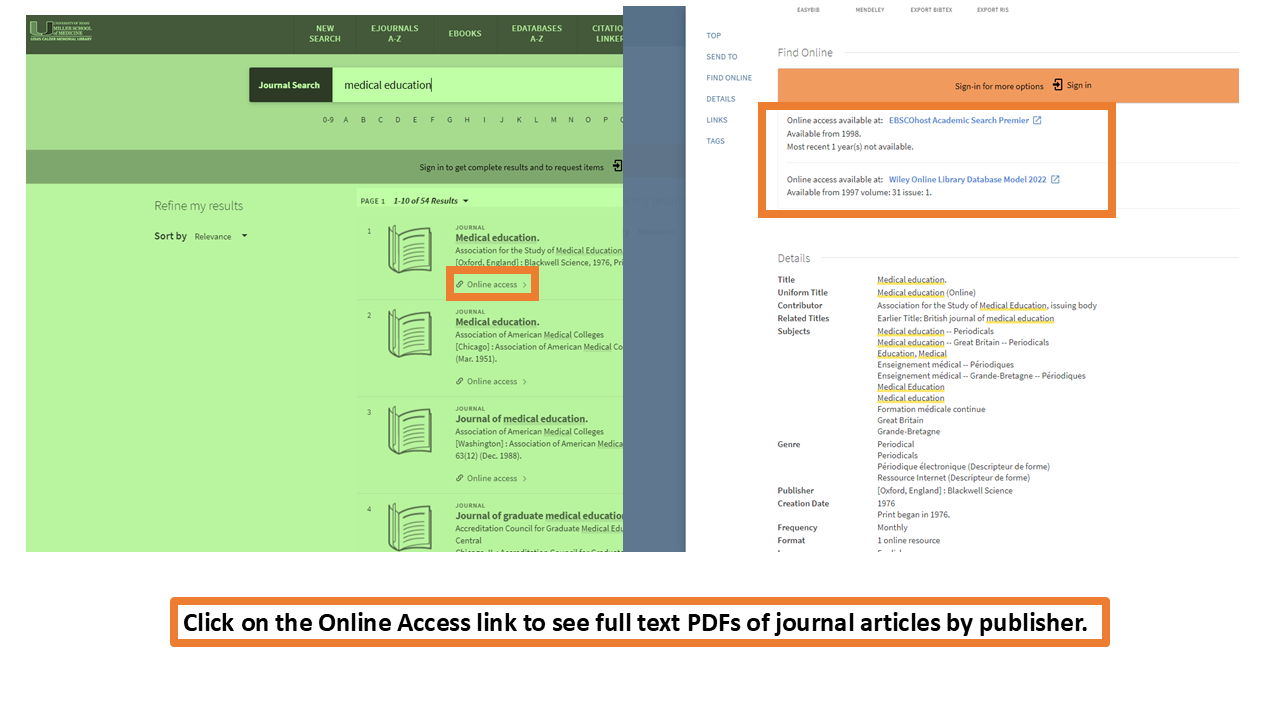
Find journals from the Journals link on the website. Once on the Journal Search page, you can type the journal title in the search box, or find them by alphabetical order. When you find the journal you need, click on the Online Access link to see full text PDFs of journal articles by publisher.
What is a Systematic Review?
The Research Compass is a dynamic new tool designed to guide you to the resources you need to make research and scholarship happen at the University of Miami.
Access the Research Compass at https://researchcompass.miami.edu/learn/course/research-compass/welcome/welcome-introduction.

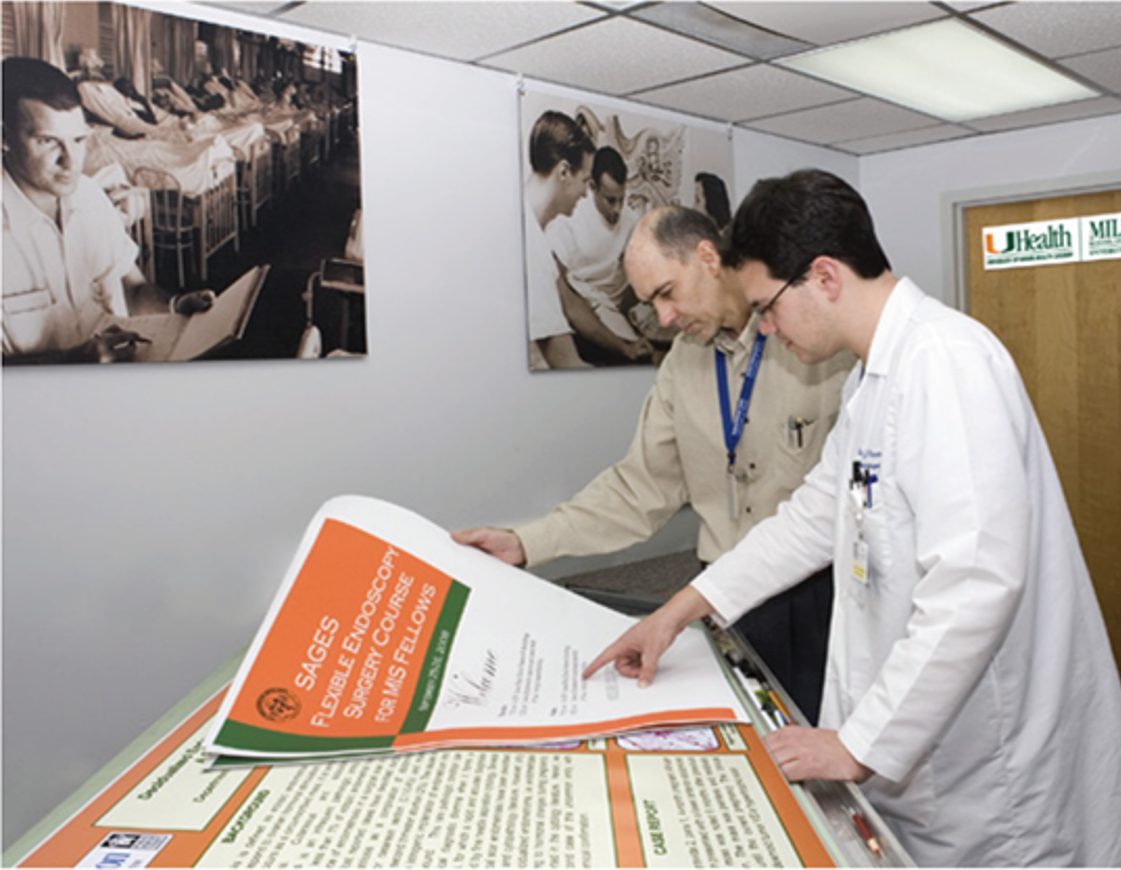 Biomedical Communications serves as the media and visual communication resource for the Miller School of Medicine faculty, staff and students.
Welcome to the Internal Medicine Residents Portal
The goals of this resource are to:
- Provide a convenient listing of the essential resources and services used in clinical practice and research.
- Show users how to access these essential resources through the Calder Library.
This guide is intended for Internal Medicine residents at the UHealth and Jackson Health Systems. It has information about both on-campus and online resources available to residents.
Get Remote Access to Library Resources
Residents and other Jackson staff have remote access to the Calder Library's resources for up to one year and must renew their account each year. Click here for additional details on how to apply and renew remote access privileges.
Connect to the library through remote access before searching databases and journals, by clicking on the EZ Proxy tab.
Library Resources & Training Videos

Access training videos on Calder Library resources and services, as well as basic and advanced searching techniques, citation management, literature reviews and research study design.
Librarians
-

Layal Hneiny
Clinical Research Librarian
-

Barbara M. Sorondo
Head of Learning, Research, and Clinical Information Services
Contact Us
Department of Learning, Research, and Clinical Information Services
- Email: reference@miami.edu
- Phone: 305-243-6648
- Ask a Librarian
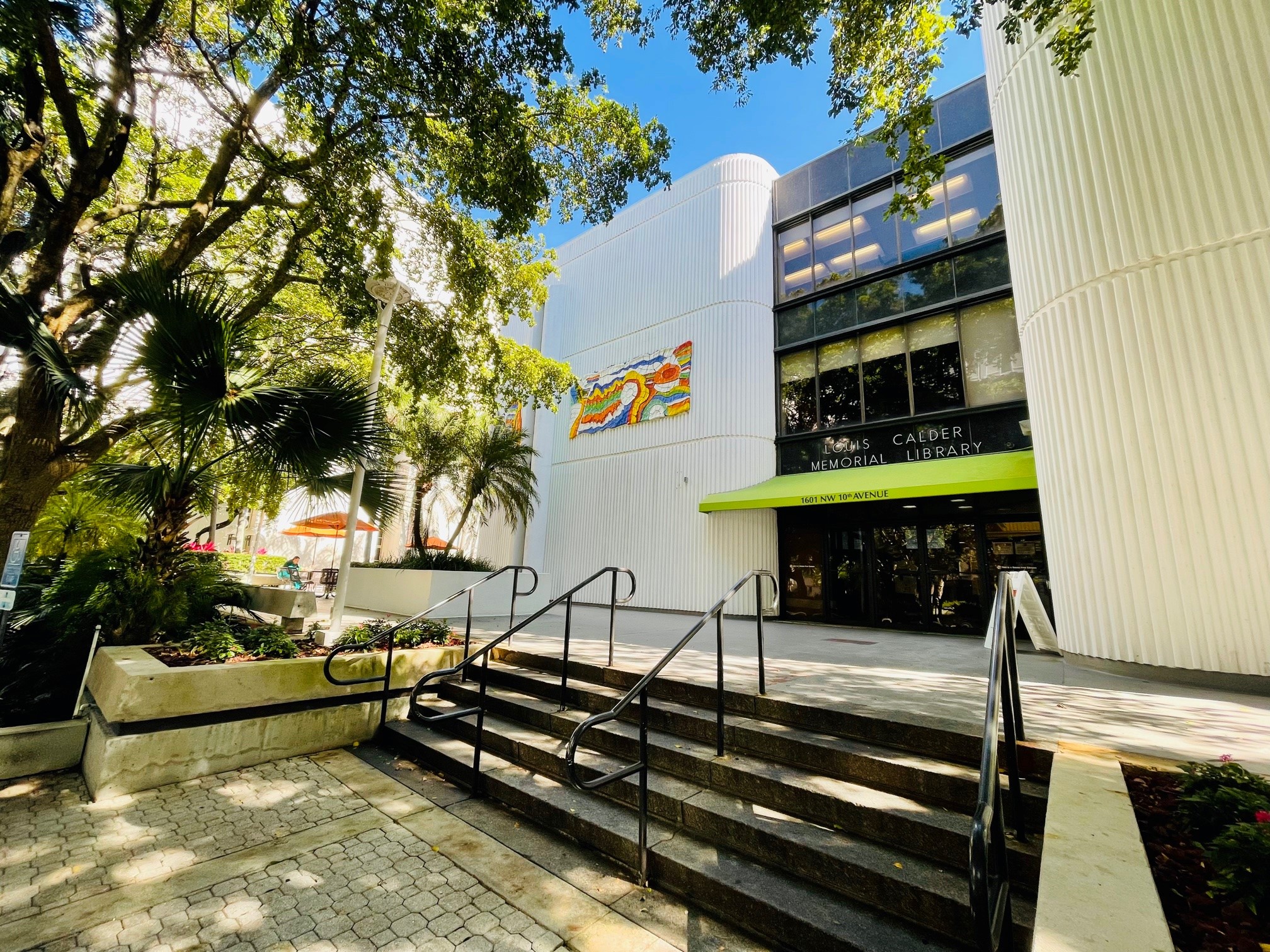
Welcome to Louis Calder Memorial Library
The Calder Library advances informed decision-making and knowledge transfer in support of the University of Miami Miller School of Medicine. The Miller School of Medicine seeks to improve the health of our community through the provision of evidence-based, client-centered health services, the discovery and dissemination of health findings, the education of medical and health leaders, and community service.
Using the Website to Find and Search for Resources
You can browse books and journals from the library homepage by clicking on the tabs in the Start Your Research section of the page. You can also search for library resources using the uSearch box at the top right of the homepage.
For more information on how to conduct searches using uSearch, look at our online uSearch Guide.
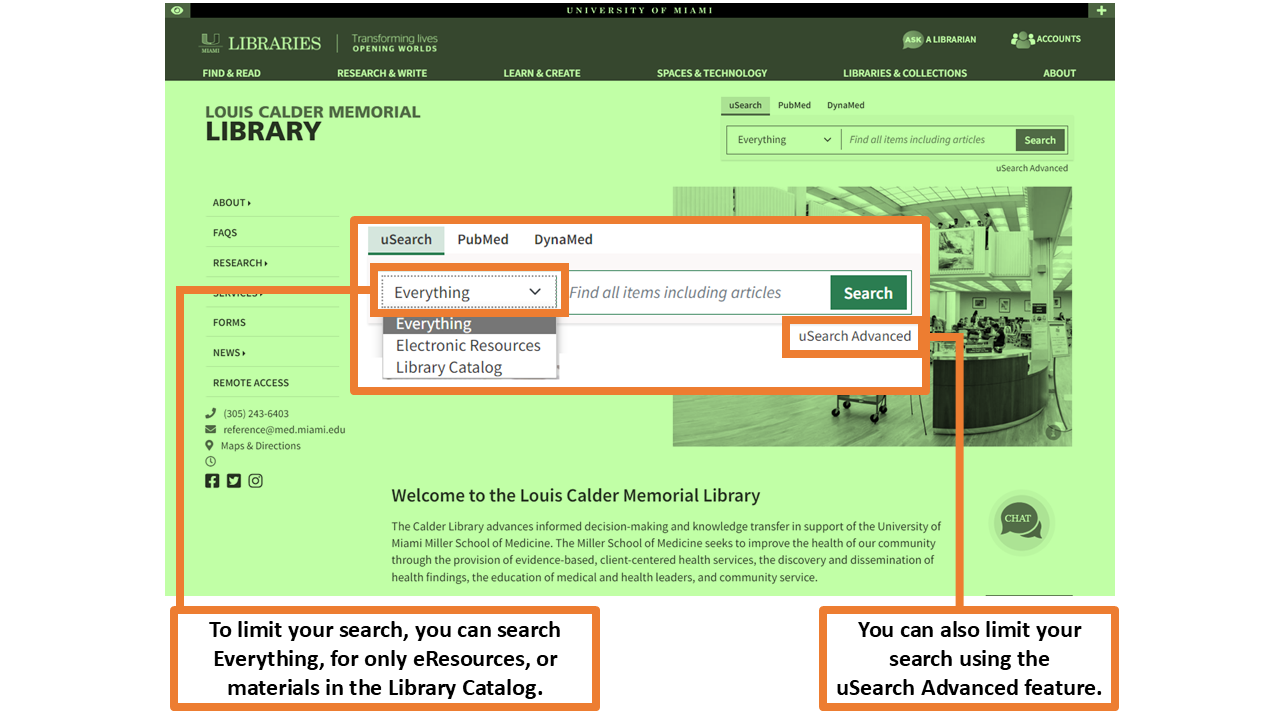
To limit your search results, you can search by Everything, Electronic Resources, or Library Catalog by clicking on the drop-down menu on the uSearch box.
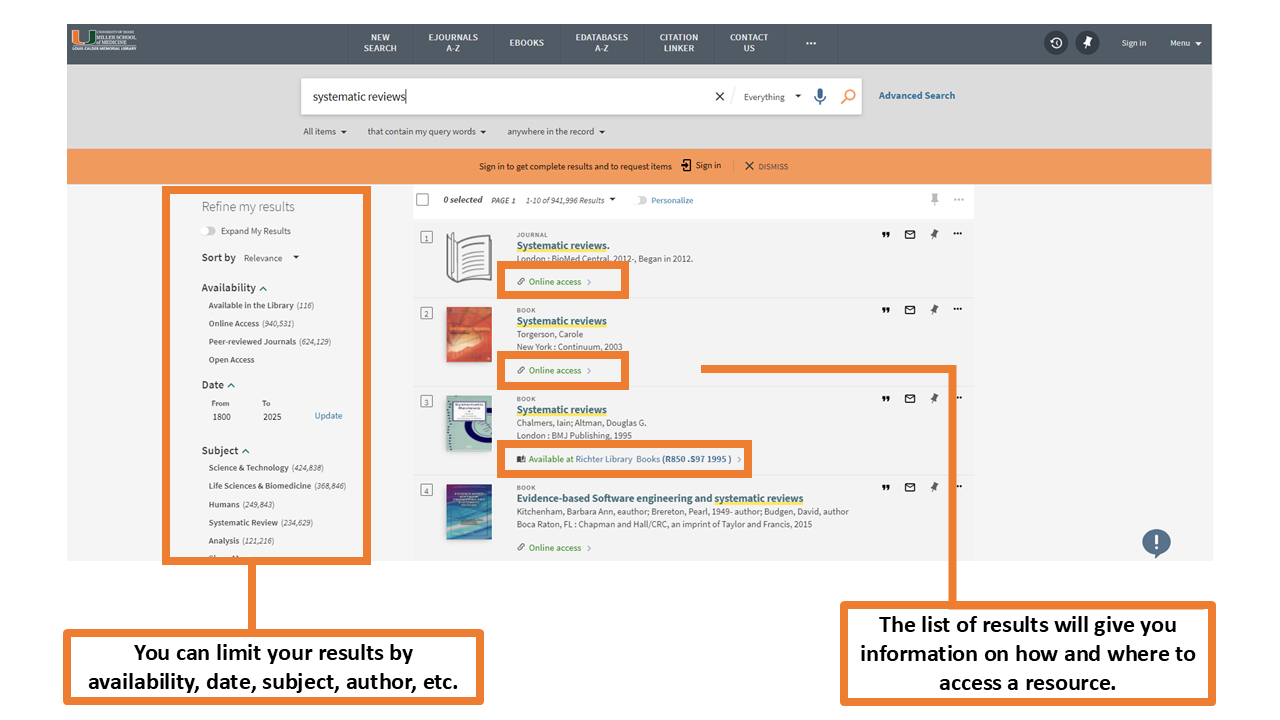
On the results page, you will find the list of results matching your search. On the left-hand side, you can further limit your search results by date, language, subject, etc.
Where to Find and Search for Books & Journals
Find journals from the Journals link on the website. Once on the Journal Search page, you can type the journal title in the search box, or find them by alphabetical order. When you find the journal you need, click on the Online Access link to see full text PDFs of journal articles by publisher.
Where to Find and Search Databases
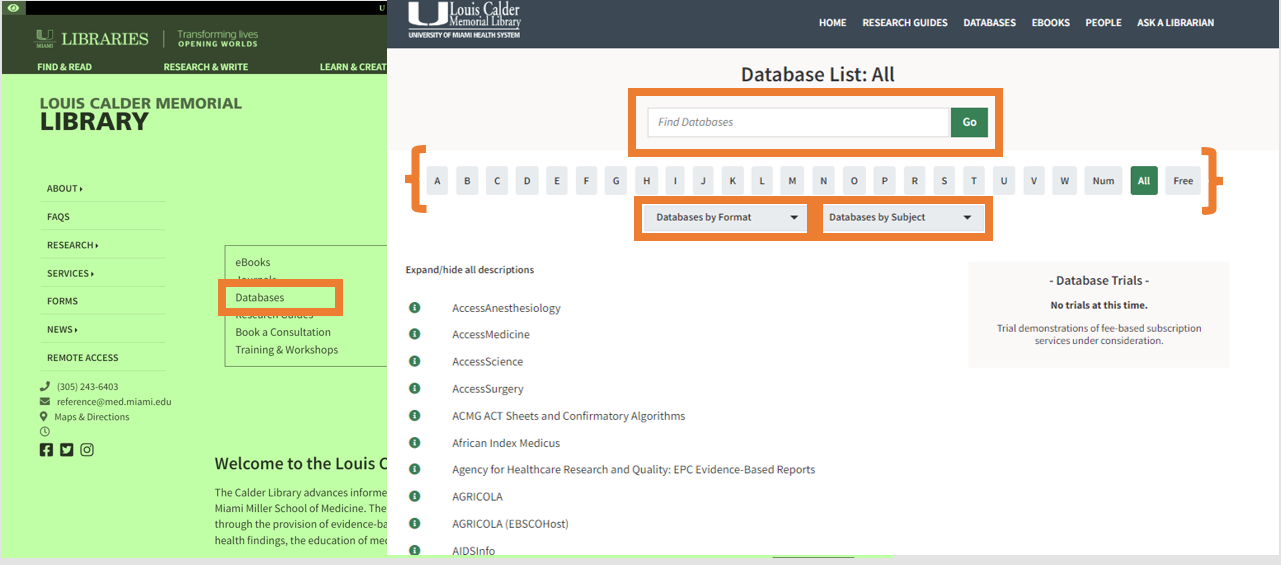
Find available databases from the Databases link on the website. Once on the Databases Search page, you can type the database title in the search box, or find them by alphabetical order. You can also search for databases by format or by subject.
Searching Basics
Below is information on how to create strategies to search health sciences databases using keywords, Boolean operators, quotation marks, truncation, and subject headings.
Keywords are automatically included with citations in a database. They are provided by authors immediately upon article submission, help you find the latest literature, and can be matched to all parts of a citation, such as the article title and abstract. However, you must know the keywords the authors used to match them in your search strategy.
Boolean operators (AND, OR, and NOT) are used to combine your search terms.
Phrase searching (with " ") encloses a fixed series of words within quotation marks to search for those words together and in that order.
Truncation is the use of an asterisk (*) to search for different word endings.
Keywords are automatically included with citations in a database. They are provided by authors immediately upon article submission, help you find the latest literature, and can be matched to all parts of a citation, such as the article title and abstract. However, you must know the keywords the authors used to match them in your search strategy.
Boolean operators (AND, OR, and NOT) are used to combine your search terms.
- AND: Use between different terms. Combining search terms with AND will make the search more targeted.
- OR: Use between similar terms. Combining search terms with OR will expand the search.
- NOT: Use NOT to exclude a term in a search strategy.
Phrase searching (with " ") encloses a fixed series of words within quotation marks to search for those words together and in that order.
Truncation is the use of an asterisk (*) to search for different word endings.
Library Resources & Searching Basics
Advanced Research Database Applications
Subject Headings
Subject headings, also known as index terms or controlled vocabulary, are tags assigned to citations in a database by experts manually. They standardize search terms, improve discoverability, capture spelling variations and acronyms, and are unique to databases. However, they take time to be assigned and are not available for all topics.
Subject headings have different names depending on the database. You can think of "subject heading" as the generic name and the database's name for its own subject headings as the brand name.
In the databases in the examples below, subject headings are referred to as:
PubMed: Medical Subject Headings or (MeSH) Terms
Embase: Emtree Terms
CINAHL: CINAHL (Subject) Headings
Subject headings have different names depending on the database. You can think of "subject heading" as the generic name and the database's name for its own subject headings as the brand name.
In the databases in the examples below, subject headings are referred to as:
PubMed: Medical Subject Headings or (MeSH) Terms
Embase: Emtree Terms
CINAHL: CINAHL (Subject) Headings
| Using Medical Subject Headings in PubMed | Using Emtree in Embase | Using CINAHL Subject Headings in EBSCOhost |
More About Searching in PubMed Topic Searching in PubMed: Using the Medical Subject Headings (MeSH) Training Course |
More About Searching in Embase What are the differences between Emtree and MeSH? Embase Quick User Guide (PDF) |
Clinical Decision Support Databases
Includes Harrison's Online and Goodman and Gilman's Pharmacology. McGraw-Hill's AccessMedicine.com is an online resource that provides students, residents, clinicians, and researchers with instant answers to clinical questions from the most trusted sources. Updated daily and expanded continuously, AccessMedicine is designed for direct access to the information necessary for completing evaluations, diagnoses, case management decisions, conducting research, medical education, or self-assessment and board review.
Bates' Visual Guide to Physical Examination
Bates Visual Guide delivers clinical skills videos from head-to-toe and systems-based physical examination techniques for the (Advanced) Assessment or Introduction to Clinical Medicine course; including Objective Structured Clinical Examination OSCEs videos. The site features more than 8 hours of video content.
ClinicalKey is a clinical search engine that supports clinical decisions by making it easier to find and apply relevant knowledge.
DynaMed is the next-generation clinical reference tool physicians can rely on for fast, easy access to point-of-care decision
support. Written by a team of specialized physicians and researchers, content is updated several times daily to include information
on the latest evidence-based research, providing practice-changing answers to clinical questions with optimized speed.
Clinical decision support tool designed to answer clinical questions that arise in daily practice. Subscription database with access for UM/JMH authorized users.
Diagnostic decision support system (CDSS) merges medical images and expert information to help you build a patient-centric differential diagnosis.
Research Databases
Database produced by NLM (National Library of Medicine) containing bibliographic references, including abstracts of articles from thousands of bio medical journals.
EMBASE, from Elsevier Life Sciences Solutions, provides extensive coverage of international biomedical journals and conferences and is a key resource for generating systematic reviews, making informed decisions in evidence-based medicine, and for post-market surveillance of drugs and medical devices.
Primary index to the international literature of nursing and health. CINAHL Plus provides a wide scope of nursing and allied health journals as well as a high number of records, full-text, and cited references. In addition, it provides full-text evidence-based care sheets, quick lessons and continuing education modules.
Cochrane Library
Collection of health databases providing independent evidence to inform clinical treatment decisions and other health related decisions. Includes: Cochrane Database of Systematic Reviews, Cochrane Controlled Trials Register, Database of Abstracts of Reviews of Effects, Cochrane Methodology Register, Health Technology Assessment Database and NHS Economic Evaluation Database.
Comprehensive index to the international literature of biomedicine including clinical practice, psychosocial issues, health care administration, medical research, nursing, and more.
A database of abstracts and citations for scholarly journal articles published since 1996, covering nearly 18,000 titles from the arts, medicine, physical sciences, and the social sciences.
The Web of Science is today's premier research platform, helping you quickly find, analyze, and share information in the sciences, social sciences, arts, and humanities. You get integrated access to high quality literature through a unified platform that links a wide variety of content with one seamless search.
Introduction to Systematic Reviews
What is a Systematic Review?
A Systematic Review is a scientific investigation that focuses on a specific question and uses explicit, pre-specified scientific methods to identify, select, assess, and summarize the findings of similar but separate studies.
It may include a quantitative synthesis (meta-analysis), depending on the available data.
Institute of Medicine (IOM) of the National Academies of Sciences.
Assistance on Reviews is Available Through the Library
Calder Librarians will work on systematic reviews and other evidence synthesis projects with students, faculty, researchers, residents, or staff members affiliated with the Miller School of Medicine, UHealth, or Jackson Health System.
As a member of a systematic review team, we can write full search strategies for multiple databases, assist with using Covidence systematic review software, provide methodological guidance, and write the search methods of the manuscript. There is typically a waitlist for these services.
We also provide education, training, and advice on systematic review searching, methods, and software for researchers who prefer to do these steps of a review themselves. There is typically only a short wait for this level of service.
If you'd like help with your systematic review, scoping review, or meta-analysis, please take the steps below:
1) Work through our subscription to the Cochrane Interactive Learning tutorials on systematic review and meta-analysis methods
2) Get familiar with the MECIR checklist for conducting a review and the PRISMA checklist(s) for reporting a review. For scoping reviews see the JBI Handbook and the PRISMA-ScR
3) Draft a protocol for your project.
4) Contact John Reynolds, at jxr1327@med.miami.edu
5) Questions? See Step 4.
As a member of a systematic review team, we can write full search strategies for multiple databases, assist with using Covidence systematic review software, provide methodological guidance, and write the search methods of the manuscript. There is typically a waitlist for these services.
We also provide education, training, and advice on systematic review searching, methods, and software for researchers who prefer to do these steps of a review themselves. There is typically only a short wait for this level of service.
If you'd like help with your systematic review, scoping review, or meta-analysis, please take the steps below:
1) Work through our subscription to the Cochrane Interactive Learning tutorials on systematic review and meta-analysis methods
2) Get familiar with the MECIR checklist for conducting a review and the PRISMA checklist(s) for reporting a review. For scoping reviews see the JBI Handbook and the PRISMA-ScR
3) Draft a protocol for your project.
4) Contact John Reynolds, at jxr1327@med.miami.edu
5) Questions? See Step 4.
Systematic Review Support
Who can use the service?
Systematic review support is available to students, faculty, and staff planning to start a systematic reviews, meta-analysis, scoping reviews or rapid reviews. Calder Librarians are collaborators who can design and manage thorough, complex searches in multiple databases for you.
Systematic review collaboration with a librarian may include:
Systematic review support is available to students, faculty, and staff planning to start a systematic reviews, meta-analysis, scoping reviews or rapid reviews. Calder Librarians are collaborators who can design and manage thorough, complex searches in multiple databases for you.
Systematic review collaboration with a librarian may include:
- Consultations with individuals and teams.
- Helping to define the research question.
- Targeting specific databases and other resources to be searched.
- Identifying database-specific search strategies.
- Conducting literature searches.
- Delivering citations into bibliographic management tools (EndNote, RefWorks, Mendeley).
- Writing the literature search method section for any manuscript.
Welcome to the Calder Library Guide for Researchers!
The goals of this guide are to:
- Provide essential information for your research endeavors.
- Help users access essential resources through the Calder Library.
This guide is intended for researchers at the University of Miami Miller School of Medicine and the Jackson Health System. It may also be helpful to researchers at other institutions, though some resources are limited to UM/JMH users per licensing agreements.
You may navigate the Research Guide by using the links on the Table of Contents at the left or by using the Tabs on top of each page.
Research Navigator & Compass
The Research Navigator is a concierge service that connects researchers to the right resources at UM. It is a one-on-one, centralized support service designed to help researchers focus on research, not roadblocks.
Contact the Research Navigator at Navigator@miami.edu.The Research Compass is a dynamic new tool designed to guide you to the resources you need to make research and scholarship happen at the University of Miami.
Access the Research Compass at https://researchcompass.miami.edu/learn/course/research-compass/welcome/welcome-introduction.
Research Guide Expert
-
Barbara M. Sorondo
Head of Learning, Research, and Clinical Information Services
-
Contact Us
Department of Learning, Research, and Clinical Information Services
- Email: reference@miami.edu
- Phone: 305-243-6648
- Ask a Librarian: http://calder.med.miami.edu/librarianask.html
Data & Visualization Services
Biomedical Data & Visualization Services at Calder Library

Biomedical Data Librarian Dr. Thilani Samarakoon can to connect you to Biomedical Research resources available via UM Libraries.
She can provide information about statistical tests, finding data sources, data visualization resources, file naming and structure, and electronic laboratory notebooks. You can also access the learning resources offered in workshops, covering topics in R, SPSS, Tableau, REDCap, GraphPad Prism, and Meta-Analysis.
Contact her at thilani.samarakoon@miami.edu for assistance.
Biomedical Data Librarian Dr. Thilani Samarakoon can to connect you to Biomedical Research resources available via UM Libraries.
She can provide information about statistical tests, finding data sources, data visualization resources, file naming and structure, and electronic laboratory notebooks. You can also access the learning resources offered in workshops, covering topics in R, SPSS, Tableau, REDCap, GraphPad Prism, and Meta-Analysis.
Contact her at thilani.samarakoon@miami.edu for assistance.
Trainings & Workshops
Data & Visualization Services Workshops at Calder Library
Gain introductory experience with data analysis in a variety of new software environments, particularly SPSS, R, and REDCap, paired with discussions of statistical analysis and data science best practices.
This workshop series is offered in the Fall and Spring semesters.

Gain introductory experience with data analysis in a variety of new software environments, particularly SPSS, R, and REDCap, paired with discussions of statistical analysis and data science best practices.
This workshop series is offered in the Fall and Spring semesters.
What is a Citation Manager?
A citation manager is a software tool that helps you organize and manage your research sources, including journal articles, books, and other references. Citation managers can help you:
- Collect: Import files and organize them into a personal library
- Organize: Create an organization system, attach PDFs, and add notes to references
- Cite: Create citations from your library as you write and insert them directly into your documents
- Share: Collaborate with others on manuscript writing and share your resources with others
EndNote Class Recording
Citation Management Tools


Citation Styles & Resources
Citation Management Guides
For more information on how to use citation management software see the guides below:
Library Resources & Training Videos
Access training videos on Calder Library resources and services, as well as basic and advanced searching techniques, citation management, literature reviews and research study design.
Biomedical Communications
Biomedical Communications serves as the media and visual communication resource for the Miller School of Medicine faculty, staff and students.Located in the library’s first floor, they provide onsite assistance for poster production, printing and binding, graphic design services.
Email: biomed@med.miami.edu
Phone: 305-243-6783
Interlibrary Loan Service (ILL)
For any full text articles or books you cannot find online, you can request them from our Interlibrary Loan department. This is a free and fast service from Calder Library.
Visit the Interlibrary Loan Services (ILL) Guide for more information.
Research Navigator
 Research Navigator Services offer support designed to assist researchers in navigating the research enterprise at the University of Miami. The service offers one-to-one, concierge-style centralized support to connect researchers to the right resources in a timely manner.
They provide guidance on funding, compliance, collaboration, hiring personnel, policies, grant-writing, publishing, promoting your work, and much more.
To speak with a member of Research Navigator Services, please visit the website for more information.
The Writing Center
 The Writing Center can assist you with various writing projects.
For more information or to schedule an appointment, click on the following link: Writing Center
UM Information Technology Support (UMIT)
For UMIT Help & Support for faculty and staff on the Medical Campus, contact them using one of the methods below: